반응형
반응형

Pandas .Series 의 item , to_CSV

pandas.Series.items


s = pd.Series(['A', 'B', 'C'])
>>> for index, value in s.items():
...     print(f"Index : {index}, Value : {value}")
Index : 0, Value : A
Index : 1, Value : B
Index : 2, Value : C

https://github.com/pandas-dev/pandas/blob/v1.4.1/pandas/core/series.py#L1662-L1689


GitHub - pandas-dev/pandas: Flexible and powerful data analysis / manipulation library for Python, providing labeled data struct

Flexible and powerful data analysis / manipulation library for Python, providing labeled data structures similar to R data.frame objects, statistical functions, and much more - GitHub - pandas-dev/...

github.com


반응형
반응형

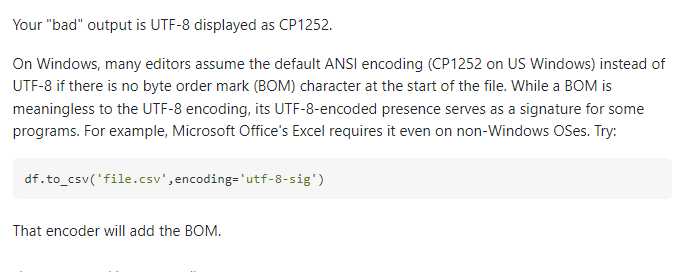
Pandas df.to_csv("file.csv" encode="utf-8") still gives trash characters for minus sign


Pandas df.to_csv("file.csv" encode="utf-8") still gives trash characters for minus sign

I've read something about a Python 2 limitation with respect to Pandas' to_csv( ... etc ...). Have I hit it? I'm on Python 2.7.3 This turns out trash characters for ≥ and - when they appear in st...

stackoverflow.com

https://stackoverflow.com/questions/25788037/pandas-df-to-csvfile-csv-encode-utf-8-still-gives-trash-characters-for-min
pandas dataframe을 csv 형태로,  to_csv 


utf-8 encoding으로 저장하면 
내용 중 한글이 깨지는 문제 발생
euc-kr 로 저장할 때는 문제 없음
df.to_csv('file.csv',encoding='euc-kr')


df.to_csv('file.csv',encoding='utf-8')
한글 깨짐


해결책: df.to_csv('file.csv',encoding='utf-8-sig')


windows 환경 (정확히는 win7)
Python 3.6.4 :: Anaconda custom (64-bit)
pandas==0.23.4


반응형
반응형

KoNLPy 한국어 처리 패키지

OSS project 한나눔(Hannanum)
한국어 형태소 분석시 + 음차표기


http://semanticweb.kaist.ac.kr/hannanum/


Semantic Web Research Center(Hannanum)

3. 세부 개발 목표 O 기능 개선 - 형태소 분석기의 핵심 기능 중 음운 규칙, 품사 관리 및 사전 관리의 모듈화 - 응용에 맞게 사용할 수 있는 음운 규칙, 품사, 사전을 각각 2가지 이상 제공 예정 -

semanticweb.kaist.ac.kr


https://datascienceschool.net/03%20machine%20learning/03.01.02%20KoNLPy%20%ED%95%9C%EA%B5%AD%EC%96%B4%20%EC%B2%98%EB%A6%AC%20%ED%8C%A8%ED%82%A4%EC%A7%80.html


KoNLPy 한국어 처리 패키지 — 데이터 사이언스 스쿨

.ipynb .pdf to have style consistency -->

datascienceschool.net


형태소 분석

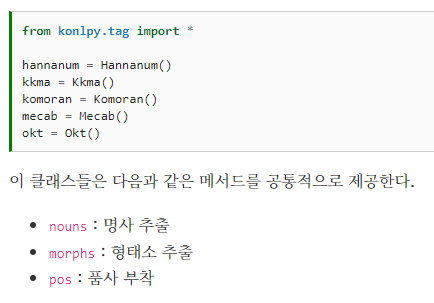
KoNLPy는 다음과 같은 다양한 형태소 분석, 태깅 라이브러리를 파이썬에서 쉽게 사용할 수 있도록 모아놓았다.

반응형
반응형

정규직으로 줄바꿈 제거하기


1.Ctrl + H 를 누른 후 (or Find > Replace)에 입력 창에 \n 을 입력한다.
2.“regular expression”을 선택한다. (Alt + R을 누르거나 [.*] 아이콘을 클릭)
3.그리고 Replace All를 누르면 모든 줄 바꿈이 삭제 됩니다.

반응형
반응형

맥에서 Windows 10 원격 데스크톱 접속하는 방법


앱스토어에서 Microsoft Remote Desktop 설치

https://apps.apple.com/kr/app/microsoft-remote-desktop/id1295203466?mt=12 


‎Microsoft Remote Desktop

‎Use Microsoft Remote Desktop for Mac to connect to a remote PC or virtual apps and desktops made available by your admin. With Microsoft Remote Desktop, you can be productive no matter where you are. GET STARTED Configure your PC for remote access using

apps.apple.com

반응형
반응형

wordcloud 패키지 설치 명령어

conda install -c conda-forge wordcloud


만약 설치후에도  오류가 발생한다면

wordcloud 패키지를 지우고 선행 패키지인 pillow 패키지를 먼저 설치한 후 wordcloud 패키지를 다시 설치한다.


> stylecloud 도 설치 하자. 

pip install stylecloud


반응형

+ Recent posts