반응형
반응형

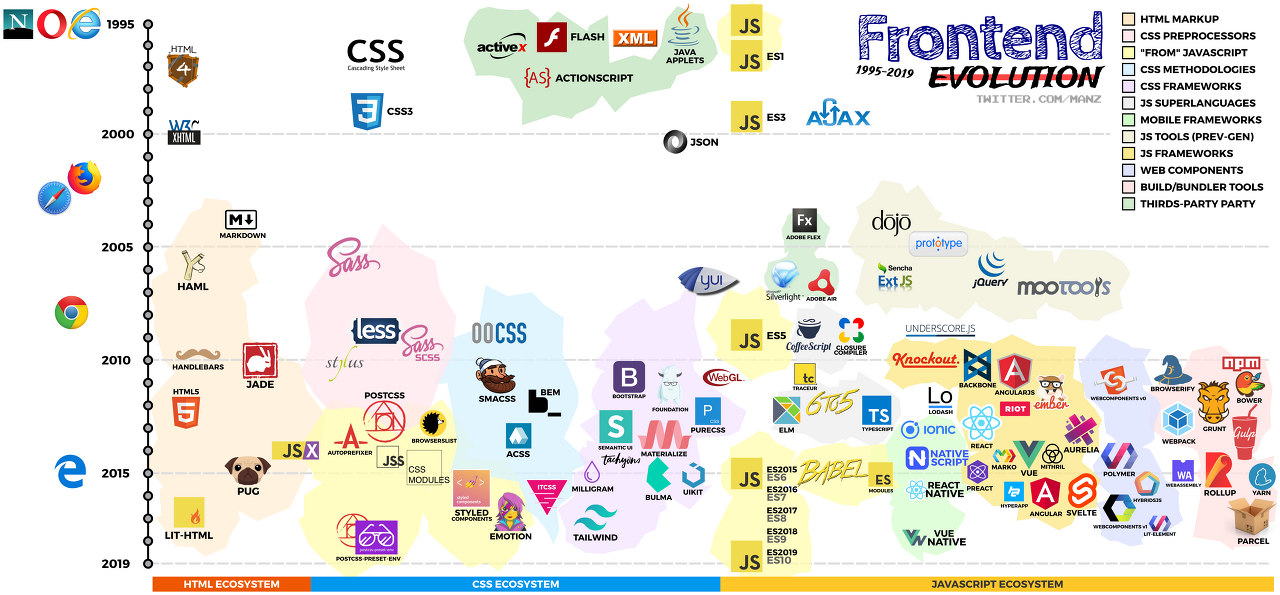
frontend-evolution


https://github.com/ManzDev/frontend-evolution


GitHub - ManzDev/frontend-evolution: Frontend Evolution timeline (1995-2019)

Frontend Evolution timeline (1995-2019). Contribute to ManzDev/frontend-evolution development by creating an account on GitHub.

github.com

https://velog.io/@teo/full-stack-developer#%ED%92%80%EC%8A%A4%ED%83%9D-%EA%B0%9C%EB%B0%9C%EC%9E%90%EB%9E%80-%EB%AC%B4%EC%97%87%EC%9D%BC%EA%B9%8C%EC%9A%94-%EA%B5%AC%EA%B8%80%EC%97%90%EA%B2%8C-%EB%AC%BC%EC%96%B4%EB%B4%A4%EC%8A%B5%EB%8B%88%EB%8B%A4


풀스택 개발자에 대해서 어떻게 생각하나요?

혹시 풀스택 개발자에 대해서 어떻게 생각하시나요?? 프론트도 재밌고 백엔드도 재밌는데 둘다 하려고 하니 T자형 개발자가 되기 힘들고, 또 "풀스택개발자는 상상속 유니콘이다" 라는 말도 있

velog.io


반응형
반응형

jquery ,  sortable, 안에 텍스트는 드래그 가능하게.  bootstrap sortable inner text dragable


https://jqueryui.com/sortable/


Sortable | jQuery UI

Sortable Reorder elements in a list or grid using the mouse. Enable a group of DOM elements to be sortable. Click on and drag an element to a new spot within the list, and the other items will adjust to fit. By default, sortable items share draggable prope

jqueryui.com


Sortable w/ Selectable Text

https://stackoverflow.com/questions/4070749/sortable-w-selectable-text


Sortable w/ Selectable Text

Is it possible to be able to have sortable elements, but still allow users to copy/paste the text inside the elements? <div class="sortable"> <div class="pseudo-sortable">Foo</di...

stackoverflow.com


What about putting your text in a <span>?

HTML

<ul id="sortable">
    <li><span>Item 1</span></li>
    <li><span>Item 2</span></li>
    <li><span>Item 3</span></li>
    <li><span>Item 4</span></li>
    <li><span>Item 5</span></li>
    <li><span>Item 6</span></li>
    <li><span>Item 7</span></li>
</ul>

jQuery

$("#sortable").sortable({
    revert: true,
    cancel: "#sortable li span"
});

Try it here: http://jsfiddle.net/6uXx8/

반응형
반응형

자바스크립트로 현재시간 timestamp 구하기

console.log( new Date().getTime() );


반응형
반응형
<html>
<head>
    <meta http-equiv="Content-Type" content="text/html; charset=utf-8">
    <style>
    #mask {
      position:absolute;
      z-index:9000;
      background-color:#000;
      display:none;
      left:0;
      top:0;
    }
    .window{
      display: none;
      position:absolute;
      left:100px;
      top:100px;
      z-index:10000;
    }
    </style>
    <script src="http://code.jquery.com/jquery-latest.js"></script>
    <script>
    function wrapWindowByMask(){
        //화면의 높이와 너비를 구한다.
        var maskHeight = $(document).height();
        var maskWidth = $(window).width();  
 
        //마스크의 높이와 너비를 화면 것으로 만들어 전체 화면을 채운다.
        $('#mask').css({'width':maskWidth,'height':maskHeight});  
 
        //애니메이션 효과 - 일단 1초동안 까맣게 됐다가 80% 불투명도로 간다.
        $('#mask').fadeIn(1000);
        $('#mask').fadeTo("slow",0.8);    
 
        //윈도우 같은 거 띄운다.
        $('.window').show();
    }
 
    $(document).ready(function(){
        //검은 막 띄우기
        $('.openMask').click(function(e){
            e.preventDefault();
            wrapWindowByMask();
        });
 
        //닫기 버튼을 눌렀을 때
        $('.window .close').click(function (e) {
            //링크 기본동작은 작동하지 않도록 한다.
            e.preventDefault();
            $('#mask, .window').hide();
        });       
 
        //검은 막을 눌렀을 때
        $('#mask').click(function () {
            $(this).hide();
            $('.window').hide();
        });
    });
    </script>
</head>
<body>
    <div id="mask"></div>
    <div class="window">
        <input type="button" href="#" class="close" value="나는야 닫기 버튼(.window .close)"/>
    </div>
    <a href="#" class="openMask">검은 막 띄우기</a>
</body>
</html>


jQuery 레이어 팝업(modal window) 띄울 때 전체를 덮는 반투명 검은 막(black mask) 만들기

출처: https://dev23.tistory.com/26 [Hello. Android!!]


jQuery 레이어 팝업(modal window) 띄울 때 전체를 덮는 반투명 검은 막(black mask) 만들기

< html > < head >     < meta http-equiv = "Content-Type" content = "text/html; charset=utf-8" >     < style >     #mask {       position:absolute;       z-index:9000;       b..

dev23.tistory.com


반응형
반응형

DateDiff 를 이용한 현재 일시 비교


<% dim nowtime_chk
   nowtime_chk = DateDiff("n", "2022년 01월 07일 00:00:00", now()) 

   if( nowtime_chk > 0 )then %>
         console.log(" 날짜 지났다.");
<%  else %>
         console.log(" 날짜 아직.");
<%
end if
%>
반응형
반응형

이미지 갤러리 한 줄에 4개씩 보여지다가, 모바일 세로일때 (가로 480px 이하일때) 한 줄에 2개씩 보여주기. 

이미지는 width=100% 로 하고 넓이는 div에서 조절. 

object-fit:contain

<div>
 	<div class='img_contain_left' ><img src='image/1번.jpg' width='100%'  ></div>
 	<div class='img_contain_left' ><img src='image/2번.jpg' width='100%'  ></div>
 	<div class='img_contain_left' ><img src='image/3번.jpg' width='100%' ></div>
 	<div class='img_contain_left' ><img src='image/4번.jpg' width='100%'  ></div>
 	<div class='img_contain_left' ><img src='image/5번.jpg' width='100%'  ></div>
 	<div class='img_contain_left' ><img src='image/6번.jpg' width='100%'  ></div>
 	<div class='img_contain_left' ><img src='image/7번.jpg' width='100%'  ></div>
 	<div class='img_contain_end'  ><img src='image/8번.jpg' width='200px'  ></div>
 </div>
    @media screen and (min-width: 480px) {                
        .img_contain_left {
        width:23.5%;
        float:left;
        object-fit: contain;
        margin: 0.25rem!important;
        }
        .img_contain_end {
        width:23.5%;
        float:left;
        object-fit: contain;
        margin: 0.25rem!important;
        }
    }
    
    @media screen and (max-width: 480px) {    
        .img_contain_left {
        width:47%;
        float:left;
        object-fit: contain;
        margin: 0.25rem!important;
        }
        .img_contain_end {
        width:47%;
        float:left;
        object-fit: contain;
        margin: 0.25rem!important;
        }
    }

1. meta viewport 설정

<meta name="viewport" content="width=device-width, initial-scale=1" />


2. 4개의 반응형 분기점

- 낮은 해상도의 PC, 태블릿 가로 : ~1024px

- 태블릿 가로 : 768px ~ 1023px

- 모바일 가로, 태블릿 : 480px ~ 767px

- 모바일 : ~480px


3. 3개의 반응형 분기점

- PC : 1024px ~

- 태블릿 가로, 세로 : 768px ~ 1023px

- 모바일 가로, 세로 : ~768px


4. Media Query 사용법

@media screen and (min-width:1024px) {
	/* Desktop */
}
@media screen and (min-width:768px) and (max-width: 1023px) {
	/* Tablet */
}
@media screen and (max-width:767px){ 
	/* Mobile */
}

5. PC / Tablet / Mobile 구분해서 CSS 파일 작성 

<link href="style_pc.css" media="screen and (min-width:1024px)" rel="stylesheet" />
<link href="style_tablet.css" media="screen and (min-width:768px) and (max-width:1023px)" rel="stylesheet" />
<link href="style_mobile.css" media="screen and (min-width:320px) and (max-width:767px)" rel="stylesheet" />


https://record22.tistory.com/98

반응형

+ Recent posts