There are multiple ways of installing IPython. This page contains simplified installation instructions that should work for most users. Our official documentation containsmore detailed instructionsfor manual installation targeted at advanced users and developers.
If you are looking for installation documentation for the notebook and/or qtconsole, those are now part ofJupyter.
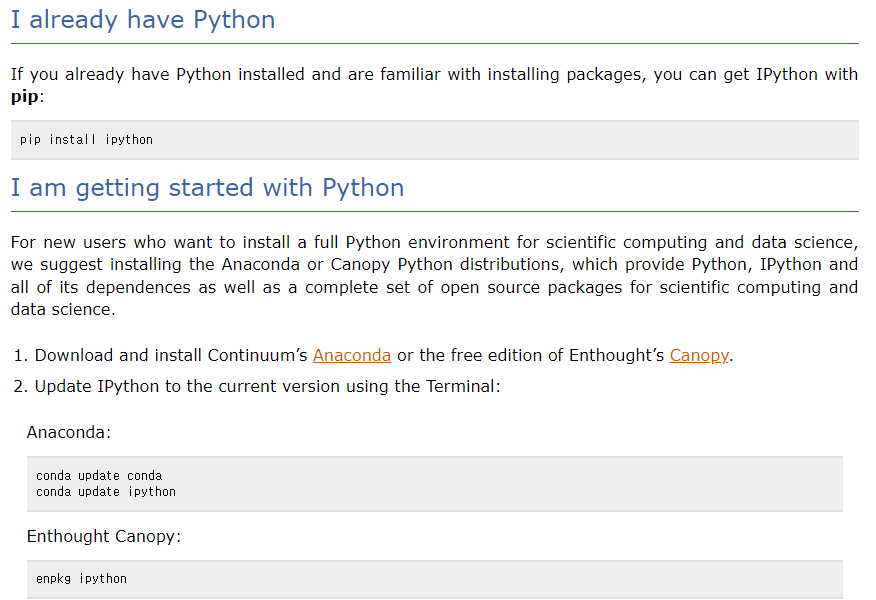
I already have Python
If you already have Python installed and are familiar with installing packages, you can get IPython withpip:
pip install ipython
I am getting started with Python
For new users who want to install a full Python environment for scientific computing and data science, we suggest installing the Anaconda or Canopy Python distributions, which provide Python, IPython and all of its dependences as well as a complete set of open source packages for scientific computing and data science.
Download and install Continuum’sAnacondaor the free edition of Enthought’sCanopy.
Update IPython to the current version using the Terminal:
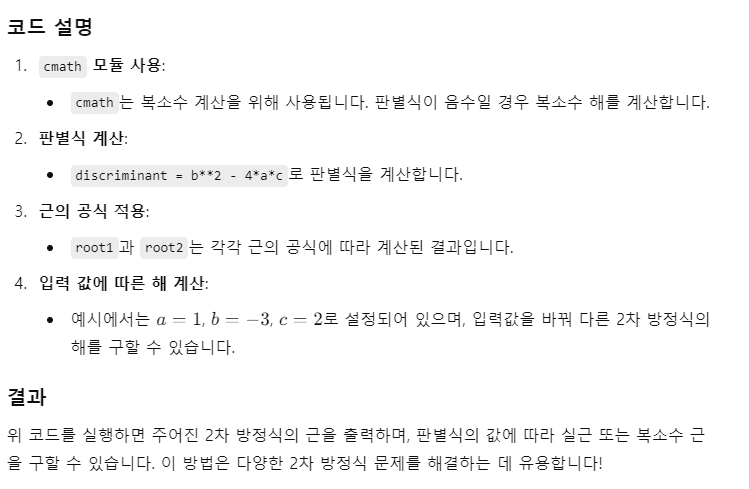
import cmath  # 복소수 계산을 위해 cmath 모듈 사용

def solve_quadratic(a, b, c):
    # 판별식 계산
    discriminant = b**2 - 4*a*c

    # 근의 공식 사용
    root1 = (-b + cmath.sqrt(discriminant)) / (2 * a)
    root2 = (-b - cmath.sqrt(discriminant)) / (2 * a)

    return root1, root2

# 예시: a, b, c 값 입력
a = 1  # x^2의 계수
b = -3  # x의 계수
c = 2  # 상수항

# 함수 호출하여 근 구하기
roots = solve_quadratic(a, b, c)

# 결과 출력
print(f"방정식의 근: {roots[0]} 과 {roots[1]}")
Apple이 2025년 봄 ‘나의 찾기(Find My)’ 네트워크를 국내 도입할 예정이다. 한국 내 사용자들도 곧 나의 찾기 앱을 이용해 개인정보가 보호된 상태에서 자신의 Apple 기기와 개인 소지품을 찾고, 친구 및 가족 등의 위치를 확인할 수 있게 된다.
나의 찾기는 사용자가 자신의 Apple 기기는 물론, AirTag 또는 나의 찾기 네트워크 액세서리를 부착해 둔 소지품의 위치까지 쉽게 파악할 수 있게 해준다. 기기나 소지품을 분실한 경우, iPhone, iPad, Mac의 나의 찾기 앱 또는 Apple Watch의 기기 찾기(Find Devices) 및 물품 찾기(Find Items) 앱을 활용하여 지도에서 위치를 확인하고, 해당 위치로 가는 경로를 안내받으며, 가까이 접근할 때 사운드를 재생하여 쉽게 찾을 수 있다.
또한 나의 찾기를 통해 사용자가 친구 및 가족과 위치를 공유해 보다 쉽게 서로를 찾고 연락을 유지할 수도 있다. 붐비는 기차역이나 혼잡한 공원 등에서 나의 찾기로 친구를 찾아야 하는 경우, iPhone 15 또는 iPhone 15 Pro 사용자는 정밀 탐색(Precision Finding) 기능을 통해 친구가 있는 위치까지 안내받을 수 있다.
from bs4 import BeautifulSoup
from markdownify import markdownify as md
import os

def convert_html_table_to_md(html_file_path, output_md_file_path):
    # HTML 파일 읽기
    with open(html_file_path, 'r', encoding='utf-8') as file:
        html_content = file.read()

    # BeautifulSoup을 사용하여 HTML 파싱
    soup = BeautifulSoup(html_content, 'html.parser')

    # HTML을 Markdown으로 변환
    markdown_content = md(str(soup))

    # 결과를 Markdown 파일로 저장
    with open(output_md_file_path, 'w', encoding='utf-8') as file:
        file.write(markdown_content)

    print(f"Converted HTML table to Markdown and saved as: {output_md_file_path}")

# 사용 예시
#html_file_path = 'path_to_your_html_file.html'  # 변환할 HTML 파일 경로
html_file_path = 'test_001.html'  # 변환할 HTML 파일 경로
output_md_file_path = 'output_markdown_file.md'  # 저장할 Markdown 파일 경로

convert_html_table_to_md(html_file_path, output_md_file_path)
Ibis defines a Python dataframe API that executes on any query engine – the frontend for any backend data platform, with 20+ backends today. This allows Ibis to have excellent performance – as good as the backend it is connected to – with a consistent user experience.
What is Ibis?
Ibis is the portable Python dataframe library.
We can demonstrate this with a simple example on a few local query engines:
import ibis

ibis.options.interactive = True
DuckDB
Polars
DataFusion
PySpark
1con = ibis.connect("duckdb://")

t = con.read_parquet("penguins.parquet")
t.limit(3)
Ibis is for data engineers, data analysts, and data scientists (or any title that needs to work with data!) to use directly with their data platform(s) of choice. It also has benefits fordata platforms,organizations, andlibrary developers.
Ibis for practitioners
You can use Ibis at any stage of your data workflow, no matter your role.
Data engineerscan use Ibis to:
write and maintain complex ETL/ELT jobs
replace fragile SQL string pipelines with a robust Python API
replace PySpark with a more Pythonic API that supports Spark and many other backends
Data analystscan use Ibis to:
use Ibis interactive mode for rapid exploration
perform rapid exploratory data analysis using interactive mode
work in a general-purpose, yet easy to learn, programming language without the need for formatting SQL strings
Data scientistscan use Ibis to:
extract a sample of data for local iteration with a fast local backend
prototype with the same API that will be used in production
preprocess and feature engineer data before training a machine learning model
Ibis for data platforms
Data platforms can use Ibis to quickly bring a fully-featured Python dataframe library with minimal effort to their platform. In addition to a great Python dataframe experience for their users, they also get integrations into thebroader Python and ML ecosystem.
Often, data platforms evolve to support Python in some sequence like:
Develop a fast query engine with a SQL frontend
Gain popularity and need to support Python for data science and ML use cases
Develop a bespoke pandas or PySpark-like dataframe library and ML integrations
This third step is where Ibis comes in. Instead of spending a lot of time and money developing a bespoke Python dataframe library, you can create an Ibis backend for your data platformin as little as four hours for an experienced Ibis developeror, more typically, on the order ofoneortwomonths for a new contributor.
Why not the pandas or PySpark APIs?
Ibis for organizations
Organizations can use Ibis to standardize the interface for SQL and Python data practitioners. It also allows organizations to:
transfer data between systems
transform, analyze, and prepare data where it lives
benchmark your workload(s) across data systems using the same code
mix SQL and Python code seamlessly, with all the benefits of a general-purpose programming language, type checking, and expression validation
Ibis for library developers
Python developers creating libraries can use Ibis to:
instantly support 20+ data backends
instantly support pandas, PyArrow, and Polars objects
read and write from all common file formats (depending on the backend)
trace column-level lineage through Ibis expressions
Most Python dataframes are tightly coupled to their execution engine. And many databases only support SQL, with no Python API. Ibis solves this problem by providing a common API for data manipulation in Python, and compiling that API into the backend’s native language. This means you can learn a single API and use it across any supported backend (execution engine).
Ibis broadly supports two types of backend:
SQL-generating backends
DataFrame-generating backends
As you can see, most backends generate SQL. Ibis usesSQLGlotto transform Ibis expressions into SQL strings. You can also use the.sql()methods to mix in SQL strings, compiling them to Ibis expressions.
While portability with Ibis isn’t perfect, commonalities across backends and SQL dialects combined with years of engineering effort produce a full-featured and robust framework for data manipulation in Python.
In the long-term, we aim for a standard query plan Intermediate Representation (IR) likeSubstraitto simplify this further.
Python + SQL: better together
For most backends, Ibis works by compiling Python expressions into SQL:
g = t.group_by(["species", "island"]).agg(count=t.count()).order_by("count")
ibis.to_sql(g)
SELECT
  *
FROM (
  SELECT
    `t0`.`species`,
    `t0`.`island`,
    COUNT(*) AS `count`
  FROM `ibis_read_parquet_pp72u4gfkjcdpeqcawnpbt6sqq` AS `t0`
  GROUP BY
    1,
    2
) AS `t1`
ORDER BY
  `t1`.`count` ASC NULLS LAST
You can mix and match Python and SQL code:
sql = """
SELECT
  species,
  island,
  COUNT(*) AS count
FROM penguins
GROUP BY species, island
""".strip()
DuckDB
DataFusion
PySpark
con = ibis.connect("duckdb://")
t = con.read_parquet("penguins.parquet")
g = t.alias("penguins").sql(sql)
g
This allows you to combine the flexibility of Python with the scale and performance of modern SQL.
Scaling up and out
Out of the box, Ibis offers a great local experience for working with many file formats. You can scale up with DuckDB (the default backend) or choose from other great options like Polars and DataFusion to work locally with large datasets. Once you hit scaling issues on a local machine, you can continue scaling up with a larger machine in the cloud using the same backend and same code.
If you hit scaling issues on a large single-node machine, you can switch to a distributed backend like PySpark, BigQuery, or Trino by simply changing your connection string.
Stream-batch unification
As ofIbis 8.0, the first stream processing backends have been added. Since these systems tend to support SQL, we can with minimal changes to Ibis support both batch and streaming workloads with a single API. We aim to further unify the batch and streaming paradigms going forward.
Ecosystem
Ibis is part of a larger ecosystem of Python data tools. It is designed to work well with other tools in this ecosystem, and we continue to make it easier to use Ibis with other tools over time.
Ibis already works with other Python dataframes like:
Note that theibis-frameworkpackage isnotthe same as theibispackage in PyPI. These two libraries cannot coexist in the same Python environment, as they are both imported with theibismodule name.
See thebackend support matrixfor details on operations supported.Open a feature requestif you’d like to see support for an operation in a given backend. If the backend supports it, we’ll do our best to add it quickly!
Community
Community discussions primarily take place onGitHubandZulip.