반응형
반응형

슈퍼리더십

[ Super-leadership ]


요약 다른 사람이 스스로 자기 자신을 이끌어갈 수 있게 도와주는 리더십.

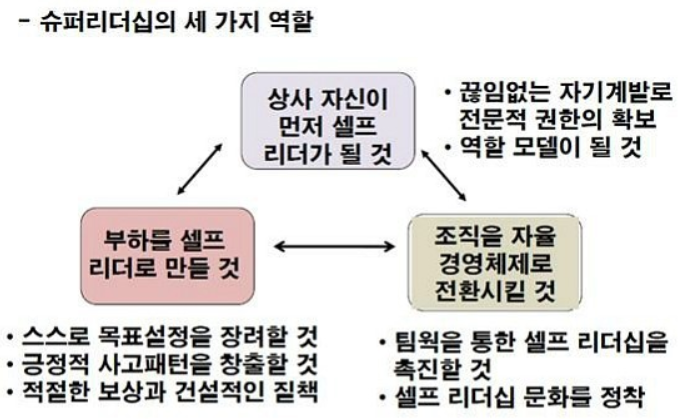
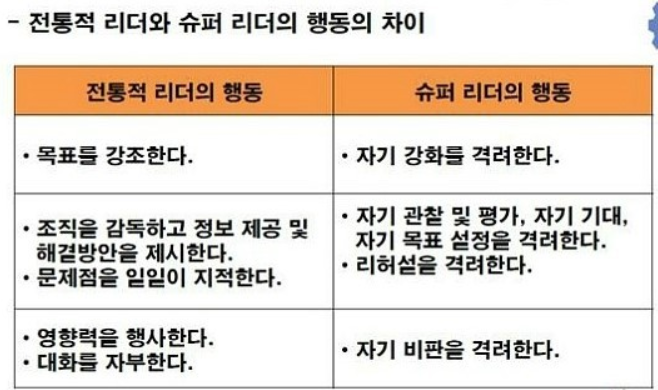
다른 사람이 스스로 자기 자신을 이끌어갈 수 있게 도와주는 리더십을 말한다. 슈퍼리더십은 셀프리더십(self-leadership)에서 출발한 개념으로 이 두 개념은 불가분의 관계에 있다. 셀프리더십이 스스로 자신을 이끌어 가는 과정이라면 슈퍼리더십은 리더 육성에 초점을 두고 부하직원들이 셀프리더십을 발휘할 수 있도록 영향력을 행사하는 과정이다. 즉, 부하직원들이 셀프 리더가 될 수 있도록 그들이 보유한 잠재역량을 자극하고 개발한다.


조직에서 리더가 슈퍼리더십을 효과적으로 발휘하기 위해서는 우선 리더 스스로 셀프리더십의 모델이 되는 것이 중요하며, 부하가 리더를 본받아 셀프 리더십을 발휘할 수 있도록 긍정적인 사고방식을 촉진시켜야 한다. 부하 스스로 목표를 설정할 수 있도록 도와주고 과업을 수행하는 과정에서 내재적으로 동기부여를 유도하는 것이 필요하다. 더 나아가 각종 지원을 통해 셀프리더십이 조직문화로 정착될 수 있게 만드는 것 또한 리더의 몫이다.

셀프리더십

[ Self- leadership ]

요약 자기 스스로 리더가 되어 자기 자신을 이끌어가는 리더십.


1986년 미국의 경영학자 맨즈(Manz, C)가 제안한 개념으로서, 자기 스스로 리더가 되어 자기 자신을 이끌어가는 리더십을 말한다. 바꾸어 말하면, 다른 사람에 대해 영향력을 행사하는 것이 아니라 스스로 자신이 나아가야 할 방향을 설정하고 자기 자신을 통제하면서 자신을 이끌어 가는 과정인 것이다. 셀프리더십은 X이론이 아닌 Y이론의 관점을 전제로 한다. 즉, 사람은 기본적으로 책임을 회피하기 보다 책임을 지려는 경향이 있고 문제해결을 위한 창의력과 자율적 통제를 위한 역량을 갖추었으며 자아실현의 욕구와 같은 고차원적인 욕구에 의해 동기부여 되는 존재라는 것이다.


셀프리더십은 자기 관리(self-management)를 포함하는 보다 상위 수준의 개념이다. 자기 관리가 해야만 하는 행동 자체에 초점을 두는 반면, 셀프리더십은 그러한 행동을 해야 하는 이유를 찾는다. 예를 들어, 금연 행동이 자기 관리 차원이라고 한다면 셀프 리더십은 금연을 하고 싶은 이유를 찾는 것에서 출발한다. 이처럼 셀프 리더십은 주어진 기준을 충족시키는 것보다는 더 높은 수준의 기준(예. 건강)을 고려한다. 이밖에도 셀프리더십은 내재적 동기부여의 역할을 강조한다는 점에서도 자기 관리와 차이를 보인다. 자기 관리가 과업 자체보다는 과업달성 이후에 받게 되는 보상에 의해 촉진된다면 셀프리더십은 과업 자체를 수행하는 과정에서 파생되는 내재적 보상을 중요하게 여긴다. 가령, 과업을 수행하면서 느끼게 되는 유능감이나 목적의식 등이 셀프리더십에서 강조된다.

반응형
반응형


apidocs.ncloud.com/ko/ai-naver/clova_speech_recognition/stt/


stt (Speech-To-Text) - API 참조서

개요 Clova Speech Recognition REST API (이하 CSR REST API)는 HTTP 기반의 REST API로 제공하는 음성인식 API로, 인식에 사용할 언어와 음성 데이터를 입력받고, 그에 맞는 인식 결과를 텍스트로 반환합니다. 입�

apidocs.ncloud.com

stt (Speech-To-Text)

  • Clova Speech Recognition REST API (이하 CSR REST API)는 HTTP 기반의 REST API로 제공하는 음성인식 API로, 인식에 사용할 언어와 음성 데이터를 입력받고, 그에 맞는 인식 결과를 텍스트로 반환합니다.
  • 입력 음성데이터 포맷은 mp3, aac, ac3, ogg, flac, wav을 지원합니다.

요청 

MethodRequest URI

POST https://naveropenapi.apigw.ntruss.com/recog/v1/stt

요청 파라미터 

파라미터 이름타입설명필수 여부

lang string 음성인식에 사용할 언어
- Kor: 한국어
- Jpn: 일본어
- Chn: 중국어
- Eng: 영어
필수

요청 헤더 

헤더명설명

X-NCP-APIGW-API-KEY-ID 앱 등록 시 발급받은 Client ID
X-NCP-APIGW-API-KEY-ID:{Client ID}
X-NCP-APIGW-API-KEY 앱 등록 시 발급 받은 Client Secret
X-NCP-APIGW-API-KEY:{Client Secret}
Content-Type application/octet-stream으로 고정
Content-Type: application/octet-stream

요청 바디 

필드명필수 여부타입제약 사항설명

image Yes mp3, aac, ac3, ogg, flac, wav 바이너리 사운드 데이터 (최대 60초) 음성 파일

응답 

응답 바디 

필드 이름데이터 타입설명

text string 음성에 대한 Text

예시 

요청 예시 

HTTP

 Copy[HTTP Request URL] https://naveropenapi.apigw.ntruss.com/recog/v1/stt?lang=Kor [HTTP Request Body] --- binary sound data ---

응답 예시 

JSON

 Copy{ "text": "안녕하세요" }

API 예제 

다음은 각 언어별 CSR API 구현 예제입니다

JAVASCRIPT

const fs = require('fs');
const request = require('request');

const clientId = 'YOUR_CLIENT_ID';
const clientSecret = 'YOUR_CLIENT_SECRET';

// language => 언어 코드 ( Kor, Jpn, Eng, Chn )
function stt(language, filePath) {
    const url = `https://naveropenapi.apigw.ntruss.com/recog/v1/stt?lang=${language}`;
    const requestConfig = {
        url: url,
        method: 'POST',
        headers: {
            'Content-Type': 'application/octet-stream',
            'X-NCP-APIGW-API-KEY-ID': clientId,
            'X-NCP-APIGW-API-KEY': clientSecret
        },
        body: fs.createReadStream(filePath)
    };

    request(requestConfig, (err, response, body) => {
        if (err) {
            console.log(err);
            return;
        }

        console.log(response.statusCode);
        console.log(body);
    });
}

stt('Kor', '음성 파일 경로 (ex: ./test.wav)');

 python

import sys
import requests
client_id = "YOUR_CLIENT_ID"
client_secret = "YOUR_CLIENT_SECRET"
lang = "Kor" # 언어 코드 ( Kor, Jpn, Eng, Chn )
url = "https://naveropenapi.apigw.ntruss.com/recog/v1/stt?lang=" + lang
data = open('음성 파일 경로', 'rb')
headers = {
    "X-NCP-APIGW-API-KEY-ID": client_id,
    "X-NCP-APIGW-API-KEY": client_secret,
    "Content-Type": "application/octet-stream"
}
response = requests.post(url,  data=data, headers=headers)
rescode = response.status_code
if(rescode == 200):
    print (response.text)
else:
    print("Error : " + response.text)

C#

using System;
using System.Net;
using System.Text;
using System.IO;
using System.Collections.Generic;
using System.Collections.Specialized;

namespace NaverAPI_Guide
{
    class APIExamSTT
    {
        static void Main(string[] args)
        {
            string FilePath = "YOUR_FILE_NAME";
            FileStream fs = new FileStream(FilePath, FileMode.Open, FileAccess.Read);
            byte[] fileData = new byte[fs.Length];
            fs.Read(fileData, 0, fileData.Length);
            fs.Close();

            string lang = "Kor";    // 언어 코드 ( Kor, Jpn, Eng, Chn )
            string url = $"https://naveropenapi.apigw.ntruss.com/recog/v1/stt?lang={lang}";
            HttpWebRequest request = (HttpWebRequest)WebRequest.Create(url);
            request.Headers.Add("X-NCP-APIGW-API-KEY-ID", "YOUR_CLIENT_ID");
            request.Headers.Add("X-NCP-APIGW-API-KEY", "YOUR_CLIENT_SECRET");
            request.Method = "POST";
            request.ContentType = "application/octet-stream";
            request.ContentLength = fileData.Length;
            using (Stream requestStream = request.GetRequestStream())
            {
                requestStream.Write(fileData, 0, fileData.Length);
                requestStream.Close();
            }
            HttpWebResponse response = (HttpWebResponse)request.GetResponse();
            Stream stream = response.GetResponseStream();
            StreamReader reader = new StreamReader(stream, Encoding.UTF8);
            string text = reader.ReadToEnd();
            stream.Close();
            response.Close();
            reader.Close();
            Console.WriteLine(text);
        }
    }
}
반응형
반응형

CLOVA Speech Synthesis 및 CLOVA Premium Voice 서비스의 신규 이용신청 제한에 대한 사전 안내 (9/17)


www.ncloud.com/support/notice/all/944


NAVER CLOUD PLATFORM

cloud computing services for corporations, IaaS, PaaS, SaaS, with Global region and Security Technology Certification

www.ncloud.com

안녕하세요. 네이버 클라우드 플랫폼입니다.


CLOVA Voice 출시에 따라 기존의 CLOVA Speech Synthesis(CSS)/CLOVA Premium Voice(CPV) 서비스의 신규 이용신청이 2020년 9월 17일부터는 제한될 예정으로 사전 안내드립니다.

네이버 클라우드 플랫폼은 새롭게 개발된 목소리(Voicefont)를 폭넓게 제공하는 CLOVA Voice 서비스를 2020년 9월 17일에 출시예정에 있습니다.  

CLOVA Voice 서비스는 기존 CSS/CPV에서 제공 중인 목소리 외 신규 목소리 12종이 추가될 예정이며, 향후에도 새로운 목소리를 CLOVA Voice 서비스를 통해 확대/제공될 예정입니다.

이에 기존 고객분들 중 이미 생성하여 사용 중인 CSS/CPV 서비스 이용에는 당분간 영향이 없을 예정이나, 더 폭넓은 서비스를 제공하는 CLOVA Voice 서비스 사용을 권장드립니다.


※ 적용 일시

  - 2020년 9월 17일


※ 적용 대상

  - 네이버 클라우드 플랫폼 이용 고객


※ 주요 변경 사항

  - CLOVA Speech Synthesis(CSS), CLOVA Premium Voice(CPV) 서비스의 신규 신청 제한

    * 새로운 CLOVA Voice로 전환을 위해 CSS 및 CPV의 신규 서비스 신청은 제한됩니다.

    * 향후 새로운 목소리는 CLOVA Voice를 통해 확대 제공 예정입니다.

    * 이미 생성하여 사용 중인 CSS 및 CPV 서비스 이용에는 영향이 없습니다.​

​


관련 문의는 ' 고객지원 문의하기' 또는 1544-5876으로 문의해 주십시오. 

앞으로도 더 나은 서비스를 제공하기 위해 노력하겠습니다.


감사합니다.


네이버 클라우드 플랫폼 드림.


반응형
반응형

Visual Studio Code에서 FTP로 remote(원격)서버 연동하기


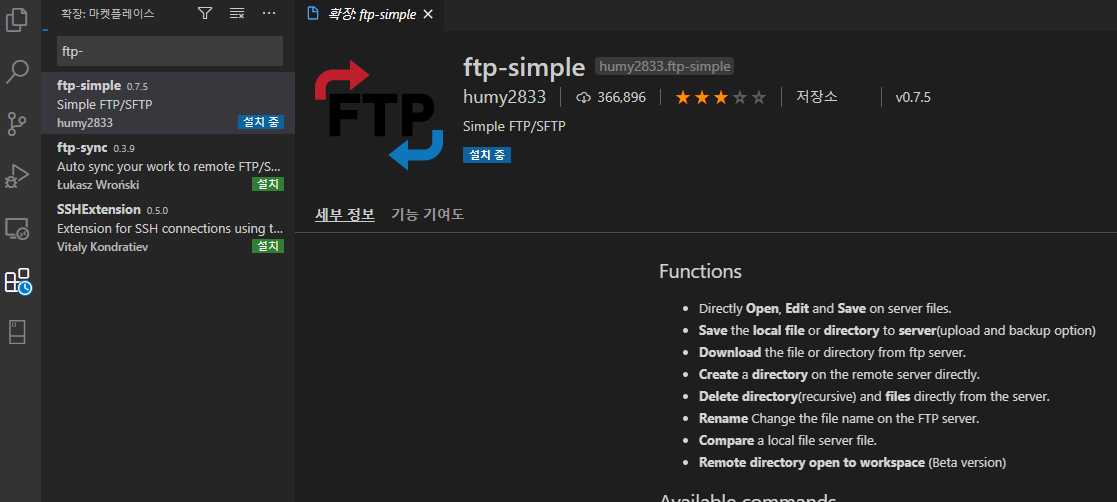
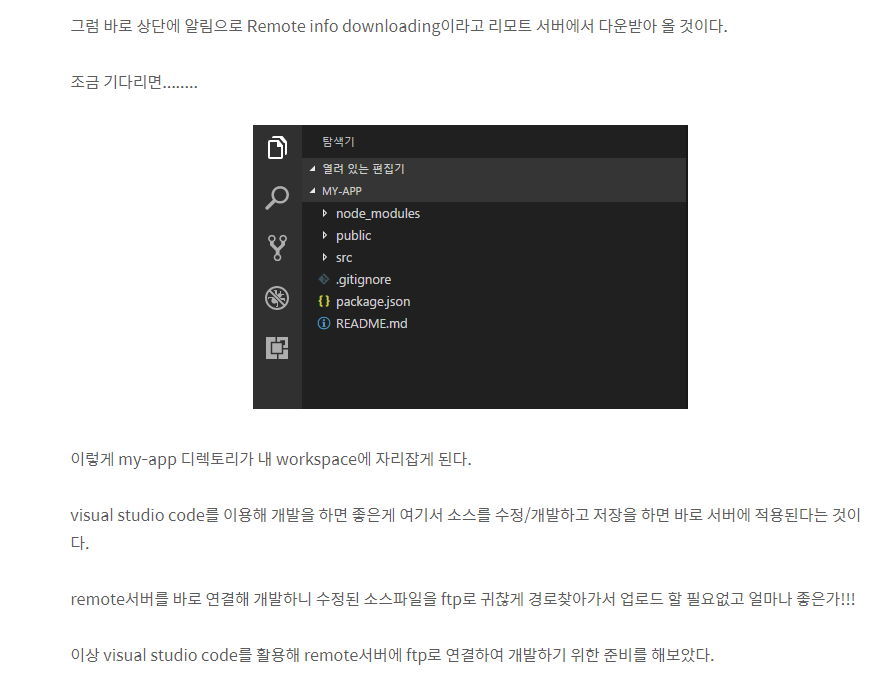
Visual Studio Code를 켜고 좌측 메뉴중 제일 밑에있는 확장버턴을 눌러준다. F1키를 눌러서 검색해도 된다.

검색창에 ftp-simple이라고 검색해본다.


설치버튼을 클릭하여 설치를 진행한다.

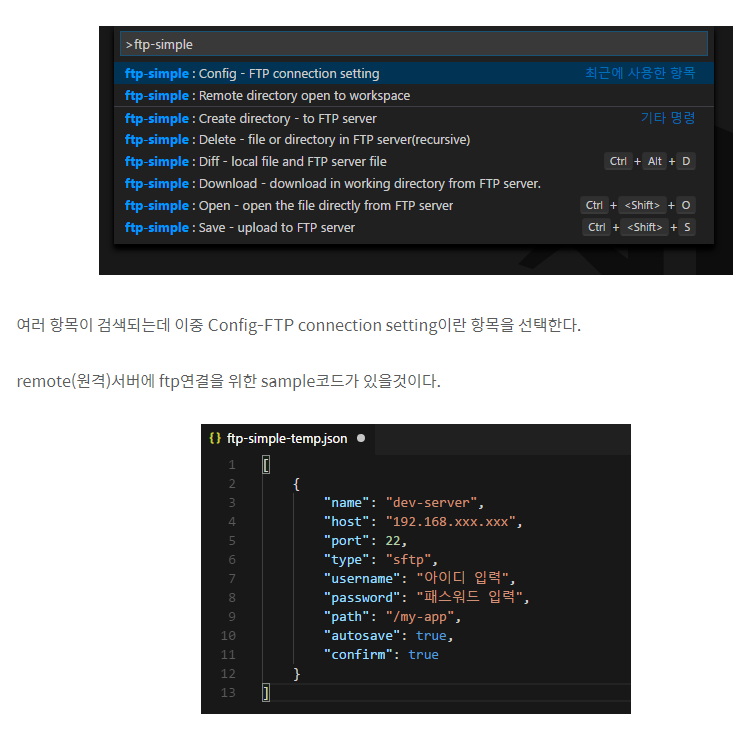
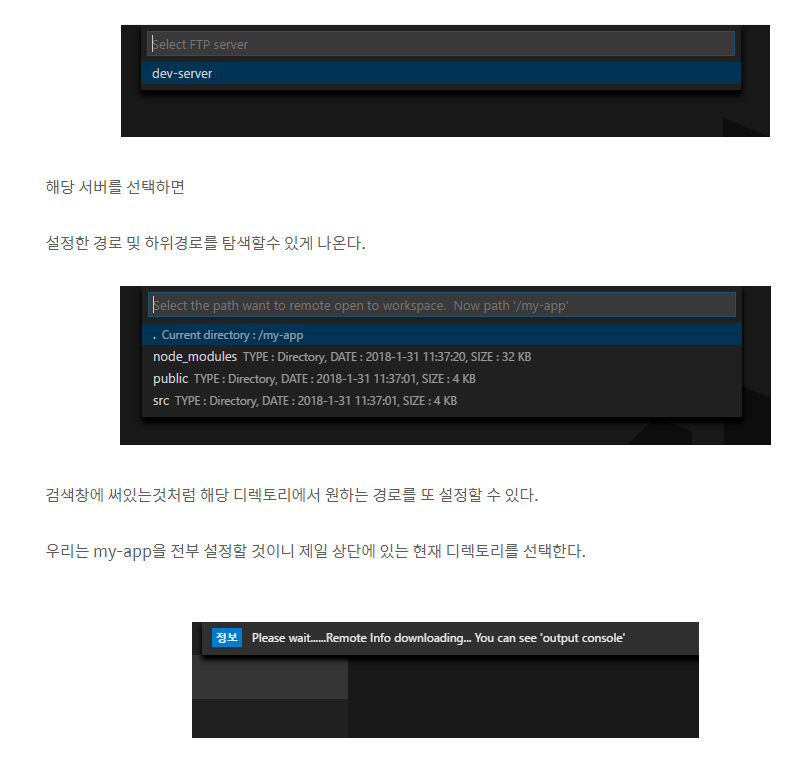
설치가 완료되면 다시 F1키를 눌러 ftp-simple을 검색한다.

[펌] gangnam-americano.tistory.com/26

반응형
반응형

play.google.com/store/apps/details?id=com.NEWmobiAudit


MobiAudit - Google Play 앱

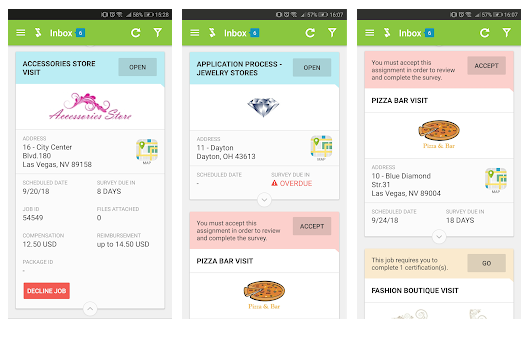
The ultimate app for mystery shopping or market research fieldwork, MobiAudit™ allows scheduling, survey and data collection for mobile devices. Data can be collected online or offline for mystery shopping, client intercept surveys, exit surveys, targete

play.google.com

apps.apple.com/us/app/mobiaudit/id390410157


‎MobiAudit

‎The ultimate app for mystery shopping or market research fieldwork, MobiAudit™ allows scheduling, survey and data collection for mobile devices. Data can be collected online or offline for mystery shopping, client intercept surveys, exit surveys, targ

apps.apple.com

미스터리 쇼핑 또는 시장 조사 현장에 대한 궁극적 인 응용 프로그램은, MobiAudit ™ 모바일 장치에 대한 일정, 조사하고 데이터를 수집 할 수 있습니다. 데이터는 온라인 또는 미스터리 쇼핑, 고객 절편 설문 조사, 출구 조사, 타겟 마케팅 조사, 내부 감사, 그리고 연구의 많은 다른 종류의 오프라인 수집 할 수 있습니다.


MobiAudit ™는 스마트 폰, 태블릿, 넷북, 노트북 및 기타 휴대용 장치에 배포하고, 또한 고객의 경험이 위조되는 정확한 순간에 피드백을 캡처하는 키오스크 및 기타 고객과의 상호 작용 터미널에 설치 될 수 있습니다.

MobiAudit ™는 그들이 더 큰 영역을 커버하고 쉽고 빠르게 정확한 데이터를 수집 할 수 있도록 오프라인으로 자신의 과제를 완료하려면 미스터리 쇼퍼, 감사, 및 다른 분야 근로자 수 있도록 Shopmetrics 플랫폼과 통합합니다.



반응형
반응형


www.w3schools.com/cssref/css_selectors.asp


CSS Selectors Reference

CSS Selector Reference CSS Selectors In CSS, selectors are patterns used to select the element(s) you want to style. Use our CSS Selector Tester to demonstrate the different selectors. Selector Example Example description .class .intro Selects all elements

www.w3schools.com

www.w3schools.com/cssref/trysel.asp


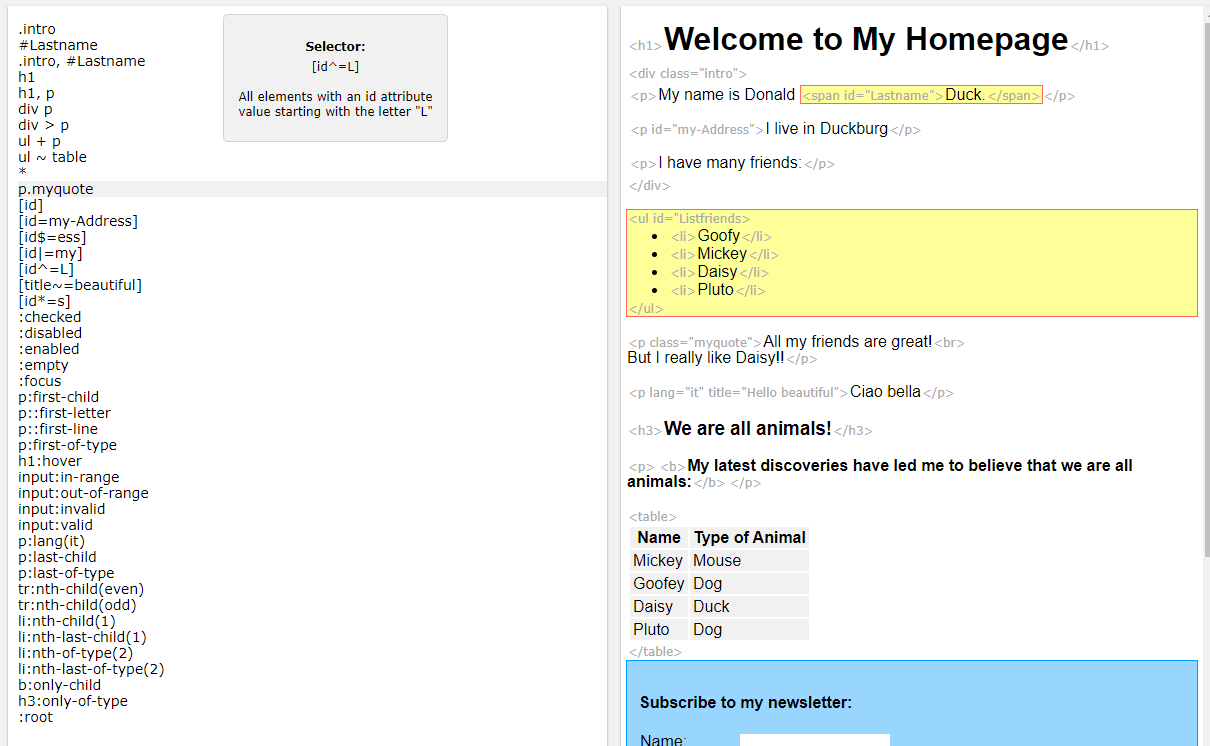
Try CSS Selector

Welcome to My Homepage My name is Donald Duck. I live in Duckburg I have many friends: Goofy Mickey Daisy Pluto All my friends are great! But I really like Daisy!! Ciao bella We are all animals! My latest discoveries have led me to believe that we are all

www.w3schools.com

CSS Selectors

In CSS, selectors are patterns used to select the element(s) you want to style.

Use our CSS Selector Tester to demonstrate the different selectors.

SelectorExampleExample description

.class .intro Selects all elements with class="intro"
.class1.class2 .name1.name2 Selects all elements with both name1 and name2 set within its class attribute
.class1 .class2 .name1 .name2 Selects all elements with name2 that is a descendant of an element with name1
#id #firstname Selects the element with id="firstname"
* * Selects all elements
element p Selects all <p> elements
element.class p.intro Selects all <p> elements with class="intro"
element,element div, p Selects all <div> elements and all <p> elements
element element div p Selects all <p> elements inside <div> elements
element>element div > p Selects all <p> elements where the parent is a <div> element
element+element div + p Selects all <p> elements that are placed immediately after <div> elements
element1~element2 p ~ ul Selects every <ul> element that are preceded by a <p> element
[attribute] [target] Selects all elements with a target attribute
[attribute=value] [target=_blank] Selects all elements with target="_blank"
[attribute~=value] [title~=flower] Selects all elements with a title attribute containing the word "flower"
[attribute|=value] [lang|=en] Selects all elements with a lang attribute value starting with "en"
[attribute^=value] a[href^="https"] Selects every <a> element whose href attribute value begins with "https"
[attribute$=value] a[href$=".pdf"] Selects every <a> element whose href attribute value ends with ".pdf"
[attribute*=value] a[href*="w3schools"] Selects every <a> element whose href attribute value contains the substring "w3schools"
:active a:active Selects the active link
::after p::after Insert something after the content of each <p> element
::before p::before Insert something before the content of each <p> element
:checked input:checked Selects every checked <input> element
:default input:default Selects the default <input> element
:disabled input:disabled Selects every disabled <input> element
:empty p:empty Selects every <p> element that has no children (including text nodes)
:enabled input:enabled Selects every enabled <input> element
:first-child p:first-child Selects every <p> element that is the first child of its parent
::first-letter p::first-letter Selects the first letter of every <p> element
::first-line p::first-line Selects the first line of every <p> element
:first-of-type p:first-of-type Selects every <p> element that is the first <p> element of its parent
:focus input:focus Selects the input element which has focus
:hover a:hover Selects links on mouse over
:in-range input:in-range Selects input elements with a value within a specified range
:indeterminate input:indeterminate Selects input elements that are in an indeterminate state
:invalid input:invalid Selects all input elements with an invalid value
:lang(language) p:lang(it) Selects every <p> element with a lang attribute equal to "it" (Italian)
:last-child p:last-child Selects every <p> element that is the last child of its parent
:last-of-type p:last-of-type Selects every <p> element that is the last <p> element of its parent
:link a:link Selects all unvisited links
:not(selector) :not(p) Selects every element that is not a <p> element
:nth-child(n) p:nth-child(2) Selects every <p> element that is the second child of its parent
:nth-last-child(n) p:nth-last-child(2) Selects every <p> element that is the second child of its parent, counting from the last child
:nth-last-of-type(n) p:nth-last-of-type(2) Selects every <p> element that is the second <p> element of its parent, counting from the last child
:nth-of-type(n) p:nth-of-type(2) Selects every <p> element that is the second <p> element of its parent
:only-of-type p:only-of-type Selects every <p> element that is the only <p> element of its parent
:only-child p:only-child Selects every <p> element that is the only child of its parent
:optional input:optional Selects input elements with no "required" attribute
:out-of-range input:out-of-range Selects input elements with a value outside a specified range
::placeholder input::placeholder Selects input elements with the "placeholder" attribute specified
:read-only input:read-only Selects input elements with the "readonly" attribute specified
:read-write input:read-write Selects input elements with the "readonly" attribute NOT specified
:required input:required Selects input elements with the "required" attribute specified
:root :root Selects the document's root element
::selection ::selection Selects the portion of an element that is selected by a user
:target #news:target Selects the current active #news element (clicked on a URL containing that anchor name)
:valid input:valid Selects all input elements with a valid value
:visited a:visited Selects all visited links


반응형

+ Recent posts